
How a saved mixer scene, a forgotten setting, and one crunchy keyboard reminded me that compression is never set-and-forget.
Same Band. Same Mixer Scene. Different Night.
One of the things I love about digital mixers is the ability to save scenes for returning bands.
I save all sorts of information in those scenes: musicians’ names, their instruments, channel assignments, routing, monitor mixes, EQ settings, and plenty more. When a band returns, recalling a previously saved scene can save me a tremendous amount of time during setup.
But here’s the catch.
Just because a band has a saved scene doesn’t mean they can simply plug in and play.
There are all sorts of factors that can affect the sound of an instrument from one performance to the next, even when the musicians are using exactly the same equipment.
Maybe the guitar player adjusted something on the pedalboard. Maybe the keyboard player changed a patch or output level. Maybe the drummer is hitting harder tonight. Even the way a vocalist approaches the microphone can change the signal I’m working with.
That’s why I always revisit my processing.
EQs might need some tweaking. Noise gates will need adjusting. And compression? Well, that’s one setting I make a point of starting fresh with every time.
At least, that’s what I’m supposed to do.
The Night I Forgot to Hit Reset
Normally, when I recall a previously saved scene, I go through the channels and reset the compressor settings so I can dial them in based on the actual signal levels and dynamics I’m getting from the musicians that evening.
But every once in a while, I get a little too comfortable with a scene that worked beautifully the last time.
And that’s exactly what happened the other night.
I had a returning band coming in, and I was busy getting everything ready for soundcheck. Since I handle the entire audio setup myself, there’s always plenty to keep me occupied.
Somewhere between getting the stage ready, checking inputs, and making sure everyone had what they needed, I completely forgot to reset the compressors.
Oops.
The good news? Soundcheck was going pretty well.
The bad news? The keyboards sounded terrible.
Houston, We Have a Crunchy Keyboard
The keyboard sounded crunchy, squashed, and just plain gross.
Not exactly the beautiful, full keyboard sound I was hoping for.
At first, I was trying to figure out what could be causing it. Was it something coming from the keyboard? A gain issue? Maybe a problem with the signal chain?
Then it hit me.
I never reset the compressors!
Sure enough, when I looked at the compressor settings on the keyboard channels, the incoming signal was getting absolutely slammed.
Suddenly, everything made sense.
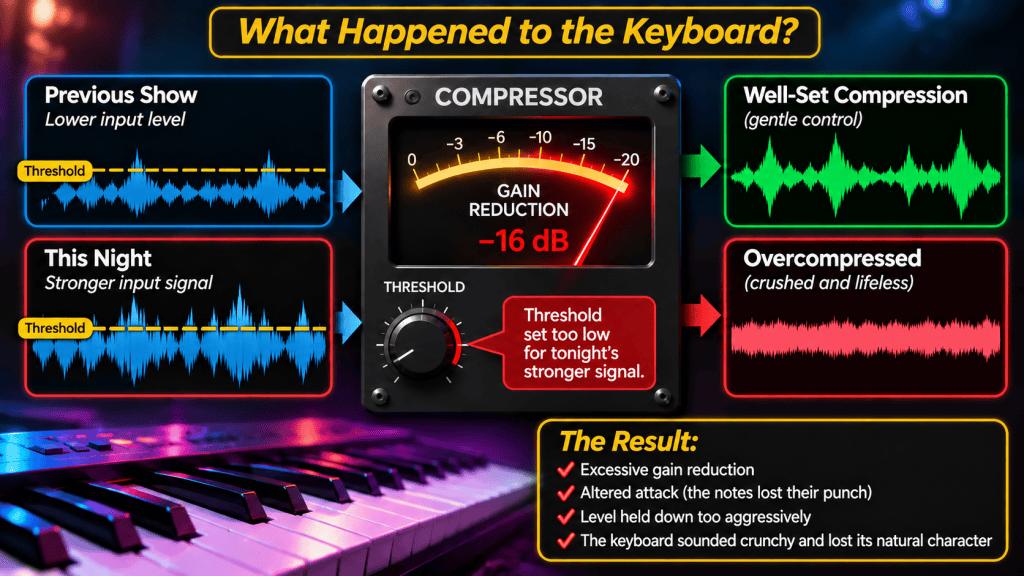
During the band’s previous performance, the keyboard player’s input level had apparently ended up lower by the time we reached the downbeat than it had been during soundcheck. I had adjusted the compressor accordingly.
Those settings worked for that particular situation.
But tonight, the keyboard signal was hitting the compressor much harder.
The compressor was doing exactly what I had told it to do. Unfortunately, what I’d told it to do no longer made sense.
Once I corrected the settings, the keyboard sounded like a keyboard again.
Problem solved.
But it was a good reminder of just how much damage an improperly adjusted compressor can do to an otherwise great signal.
Compression: The Art of Controlling Dynamics
So what exactly does a compressor do, and why do we use one?
In simple terms, a compressor reduces the dynamic range of an audio signal by controlling how much its level can increase above a chosen threshold.

Think about a singer who goes from singing softly during a verse to really belting it out during the chorus.
Without compression, the level difference can be substantial. You might find yourself constantly riding the vocal fader just to keep the singer sitting comfortably in the mix.
A compressor can help manage those changes automatically.
When the signal crosses a predetermined level, the compressor begins reducing the amount by which it increases. Louder moments become more controlled, while quieter moments can remain relatively untouched.
Used properly, compression can help create a more polished, consistent mix without making the music sound unnatural.
And it’s not just for vocals.
Here are a few situations where compression can be particularly helpful.
Vocals: A singer might go from whispering to belting within the same song. A compressor can help control the louder passages while preserving the emotional dynamics of the performance.
Bass guitar: Different notes and playing techniques can produce noticeably different levels. Compression can help smooth out those differences and keep the bass sitting comfortably in the mix.
Drums: Compression can help control peaks, shape the attack and sustain of individual drums, or add punch and consistency. Depending on the settings, it can make a drum sound tighter or more aggressive.
Acoustic guitar: Fingerpicking and energetic strumming can have very different levels. A little compression can help keep the instrument balanced without losing the natural character of the guitar.
Keyboards: Certain patches have a wide dynamic range or significant level differences. Compression can help manage those changes when needed.
Notice that I said when needed.
Not every instrument requires compression, and not every dynamic variation needs to be controlled.
Sometimes the dynamics are exactly what make the performance exciting.
When Compression Becomes the Problem
Let’s get back to that crunchy keyboard.
Why did it sound so awful?
Because the compressor was responding to a much stronger signal than the one its settings had originally been adjusted for.
One of the most important compressor settings is the threshold. This determines the level at which the compressor begins reducing the signal. Once the signal exceeds that threshold, the compressor applies what’s called gain reduction.
In my case, the threshold was set too low for the keyboard signal I was receiving that evening, resulting in excessive gain reduction.
Instead of gently controlling the dynamics, it was crushing them.
The natural attack of the notes was being altered, the level was being held down too aggressively, and the character of the instrument was suffering.
Depending on the compressor’s settings, excessive compression can also create audible pumping, unnatural changes in sustain, or even distortion.
In my case, the keyboard had lost the clarity and musical character I expected to hear.
And here’s something worth remembering:
A compressor doesn’t know what sounds good. It only knows how to respond to the signal and settings you give it.
The compressor wasn’t malfunctioning.
It was just following orders.
Unfortunately, those orders were left over from another night.
Just Because You Can Compress It Doesn’t Mean You Should
My keyboard situation was simply an oversight, and fortunately, one that was easy to correct.
But there’s another compression problem I see that isn’t quite so accidental.
Engineers sometimes reach for compression because they assume every channel needs it.
Vocals? Compress them.
Bass? Compress it.
Guitars? Compress them.
Keyboards? Sure, why not?
Before long, nearly every channel is being squeezed.
The problem is that compression isn’t automatically an improvement.
Too much compression can rob a mix of its natural movement and excitement. Instruments lose their punch. Vocals lose their expression. Everything starts sounding flat and lifeless.
And when multiple channels are heavily compressed, all those little changes in dynamics that make musicians sound like they’re actually playing together can begin to disappear.
Here’s a question I think every engineer should ask before engaging a compressor:
What problem am I trying to solve?
If you can’t answer that question, you might not need compression at all.
And sometimes the best compressor setting is simply bypass.
Trust Your Ears, Not Yesterday’s Settings
That evening’s crunchy keyboard was a good reminder of something I already knew but occasionally need to be reminded of.
A saved mixer scene is a starting point, not a finished mix.
The settings that worked perfectly for a band last month might be completely wrong tonight.
That’s especially true with compression because its behavior depends so heavily on the signal level feeding it.
My routine is to start fresh with compressor settings, listen to what the musicians are actually delivering, and make decisions based on what the music needs.
And whenever I dial in compression, I like to bypass it occasionally to make sure I’m actually improving the sound rather than simply making it different.
Compression is an incredibly powerful tool. Used thoughtfully, it can add consistency, control, punch, and polish to a mix.
Used carelessly, it can turn a beautiful keyboard into something that sounds like it’s being played through a broken toaster.
Thankfully, this time, all it took was a few adjustments to get things back on track.
The takeaway?
Save your scenes. They’re incredibly useful.
But don’t let yesterday’s successful mix make today’s decisions for you.
Because the compressor will faithfully do exactly what you tell it to do.
Even when you’re wrong.





Leave a Reply